
Most people who land on your online store will never come back. They browse, they leave, and you never Most people who land on your online store will never come back. They browse, they leave, and you never even get their email address.
A popup form is the simplest way to fix that. It is a small, timed message that appears on your website and invites a visitor to join your list, usually in exchange for a discount, a freebie, or early access to something useful. Tools like Adflipr’s popup forms builder make it easy to set this up for Shopify and WooCommerce stores without any coding.
Done right, a popup form can turn a one-time visitor into a subscriber, and eventually into a paying customer. Done wrong, it just annoys people and makes them close the tab faster.
In this guide, you will learn what a popup form actually is, how it works behind the scenes, the different types you can use, real examples from Shopify and WooCommerce stores, and the mistakes that quietly kill conversions. By the end, you will know exactly how to build a popup form that grows your list without hurting your user experience.
What Is a Popup Form?
A popup form is a small window or overlay that appears on top of your website content, asking a visitor to take an action, usually to enter their email address, phone number, or both.
It is different from a regular contact form because it is triggered automatically, based on visitor behavior like time on page, scroll depth, or exit intent, rather than the visitor clicking a link to find it.
Most popup forms include three basic parts:
- A headline that states the offer or benefit
- A form field (usually just email, sometimes phone number for SMS)
- A call to action button that submits the form
The goal is always the same: capture contact information so you can keep talking to that visitor after they leave your site.
Why Popup Forms Matter for Ecommerce Stores
Here is the uncomfortable truth about ecommerce traffic. Most visitors do not buy on their first visit. Industry data shows ecommerce businesses achieve the highest popup conversion rate of any industry, averaging 6.88 percent, which is significantly higher than media, education, or B2B sites.
That matters because email is still one of the highest-converting channels you own. Unlike social media followers or paid ad clicks, an email subscriber is someone you can reach directly, repeatedly, and for free.
A well-placed popup form gives you three things:
- A bigger email list, which fuels every future campaign
- First-party data, which matters more now that ad tracking is getting harder
- A direct line to abandoning visitors, so you are not losing them for good
For Shopify and WooCommerce stores specifically, this is even more important because most traffic comes from paid ads or social media, both of which are getting more expensive. A popup form helps you capture the value of that traffic before the visitor disappears.
How Does a Popup Form Work?
A popup form works through a simple sequence: trigger, display, submission, and follow-up.
Step 1: A Trigger Fires
The popup does not show up randomly. It is set to appear based on a specific trigger, such as:
- Time on page (for example, after 7 to 10 seconds)
- Scroll depth (for example, after the visitor scrolls 35 to 50 percent of the page)
- Exit intent (when the cursor moves toward the browser’s close button)
- Page count (after the visitor views a second page)
- Click trigger (when someone clicks a specific button or link)
Step 2: The Popup Displays an Offer
The popup shows a headline, an incentive, and a form field. Common incentives include a percentage discount on the first order, free shipping, a giveaway entry, or a downloadable guide.
Step 3: The Visitor Submits Their Information
If the offer is relevant and the timing feels right, the visitor enters their email (and sometimes phone number) and clicks submit.
Step 4: The Data Flows Into Your Email Platform
Once submitted, the contact is automatically added to your email marketing platform, often triggering a welcome email or a discount code delivery within seconds. This is where a platform like Adflipr comes in, since the popup form integrates directly with your Shopify or WooCommerce store and starts an automated welcome journey without any manual work on your end. If you want a deeper walkthrough of what happens after that, this Shopify Email Marketing Guide covers the full setup.
Types of Popup Forms You Can Use on Your Website
Not every popup form should look or behave the same way. Here is a breakdown of the main types and when to use each one.
| Popup Type | Best Trigger | Best Use Case |
|---|---|---|
| Welcome popup | Time-based (7 to 10 sec) | New visitor list building |
| Exit-intent popup | Cursor movement toward exit | Recovering visitors about to leave |
| Scroll-triggered popup | 35 to 50 percent scroll | Engaged readers, blog traffic |
| Multi-step (micro-commitment) popup | Time or scroll | Higher-intent leads, quiz style offers |
| Gamified (spin-to-win) popup | Time-based | Fun, discount-driven stores |
| Cart abandonment popup | Add to cart, then exit intent | Recovering near-purchase visitors |
| Mobile teaser bar | Time-based, low screen coverage | Mobile-first stores |
Welcome Popup
This is the most common type. It appears for first-time visitors and usually offers 10 to 20 percent off the first order in exchange for an email address.
Exit-Intent Popup
This popup only appears when the system detects the visitor is about to leave, usually by tracking cursor movement toward the top of the browser window. It is one of the best ways to recover a visitor before they leave for good.
Scroll-Triggered Popup
Instead of interrupting a visitor right away, this popup waits until they have shown real interest by scrolling through your content. It tends to feel less intrusive because it respects the visitor’s browsing behavior first.
Multi-Step Popup
Instead of asking for an email right away, this format starts with a low-friction question, such as “What are you shopping for today?” and only asks for the email on the second step. Data suggests multi-step popup flows often see conversion uplifts of around 86 percent compared to static, single-step forms.
Gamified Popup
A spin-to-win wheel or scratch card format that gamifies the discount reveal. These tend to perform very well on Shopify fashion and beauty stores, where top-performing gamified popups can achieve 8 to 15 percent conversion rates, compared to 5 to 8 percent for standard discount popups.
Cart Abandonment Popup
Triggered when a visitor adds a product to their cart and then shows exit intent, this popup form reminds them what they are about to leave behind, sometimes with a small incentive to complete the purchase.
Mobile Teaser Bar
On mobile, a full-screen popup can hurt your SEO ranking and user experience. A smaller bottom bar or teaser bar respects Google’s guidelines on intrusive interstitials while still capturing attention.
Best Popup Form Examples for Shopify and WooCommerce Stores
Example 1: Shopify Fashion Store
A Shopify apparel brand uses a welcome popup that appears after 8 seconds, offering 15 percent off the first order. The popup form only asks for an email address, keeping friction low. Once submitted, Adflipr automatically triggers a 3-email welcome series that introduces the brand, shares bestsellers, and reminds the subscriber about their discount code before it expires.
Example 2: WooCommerce Home Goods Store
A WooCommerce store selling home decor uses a scroll-triggered popup form that appears only after a visitor scrolls 40 percent down a blog post. Instead of a discount, it offers a free “home styling checklist” as a lead magnet, which fits a longer research-based buying cycle common in home goods.
Example 3: Shopify Beauty Brand
A beauty brand uses a gamified spin-to-win popup on its homepage. Visitors spin a wheel for a chance to win 10, 15, or 20 percent off. This format alone increased their popup conversion rate well above the industry average, since gamified popups consistently outperform static offers for high-frequency purchase categories like beauty.
Example 4: WooCommerce Electronics Store
Since electronics buyers are usually in research mode, this WooCommerce store skips the aggressive discount popup and instead uses an exit-intent popup offering a comparison guide between product models, matching the slower buying cycle typical of this category.
How to Design a High-Converting Popup Form
Keep the Form Short
Every additional field you ask for reduces conversions. For most popup forms, one field, just the email address, is enough. You can always collect names and preferences later through a welcome series or on-site quiz.
Respect Timing
Showing a popup form the instant someone lands on your site almost always backfires. Waiting 7 to 10 seconds, or triggering based on scroll depth, gives the visitor a chance to actually see your site before you ask for anything.
Make the Offer Specific
A vague “Sign up for updates” message rarely converts. A specific offer like “Get 15% off your first order” performs far better because the value is immediately clear.
Design for Mobile First
Since a large share of ecommerce traffic comes from mobile devices, your popup form needs to work well on small screens. Use a smaller “safe zone” size, large touch-friendly buttons, and an easy-to-tap close button.
Personalize Based on Visitor Type
Returning visitors should not see the same welcome popup as brand-new visitors. Segmenting your popup form by visitor type, traffic source, or browsing behavior improves both conversion rate and subscriber quality. For more on where segmentation tends to break down, see this breakdown of common email marketing mistakes.
Suppress Popups for Existing Subscribers
Nothing frustrates a customer more than being asked to sign up for something they already joined. Make sure your popup form logic suppresses the offer for people who already subscribed or already purchased.
Test Continuously
Timing, headline, offer, and design should all be tested over time. Small changes, like moving from a corner popup to a centered popup, can noticeably shift your conversion rate, since center-positioned popups tend to convert better than corner or bottom placements.
Common Mistakes to Avoid With Popup Forms
Showing the popup too early. A popup that appears at 0 seconds interrupts the visitor before they have any context, which increases bounce rate instead of building trust.
Asking for too much information upfront. Requesting name, phone number, birthday, and email all at once feels like a wall. Start with email only.
Using a generic, non-specific offer. “Join our newsletter” does not motivate anyone. Lead with a clear, tangible benefit.
Ignoring mobile experience. A popup form that covers the entire mobile screen can hurt both conversions and SEO rankings, since search engines penalize intrusive mobile interstitials.
Not connecting the popup to automation. Capturing an email is only half the job. If that email does not immediately flow into a welcome email or automated journey, you are leaving revenue on the table.
Showing the same popup to everyone. A one-size-fits-all popup form ignores the fact that new visitors, returning visitors, and existing customers all need different messaging.
Never testing or updating the popup. A popup form that has not changed in a year is a popup form that is probably underperforming compared to what it could be.
Case Studies and Data: What the Numbers Actually Show
Talk is cheap when it comes to pop
ups. Here is what real data and real brands show about popup form performance in 2026.
The Multi-Step Format Wins Big
Wisepops, which studied 1.8 million popup displays across ecommerce stores, found that brands using micro-commitment, multi-step popups to promote seasonal giveaways and first-order discounts saw noticeably stronger engagement than static, single-step forms. Two brands worth noting from that dataset:
- Emma Sleep uses multi-step, micro-commitment popups for its seasonal giveaways and first-order discount campaigns, breaking the ask into smaller steps instead of one intimidating form.
- Death Wish Coffee, one of the top-performing brands on Shopify, keeps its first popup screen down to a single tap before asking for any contact details, reducing friction right from the first interaction.
The takeaway for your store: if your current popup form asks for an email straight away and conversions feel flat, testing a two-step version (a quick question first, then the email field) is one of the highest-leverage changes you can make.
Timing and Placement Change Everything
Across a sample of over 1 billion popup displays, the average popup conversion rate reached 4.82 percent in 2026, up from 4.65 percent the year before, with the top 10 percent of campaigns averaging 57.7 percent. That gap between average and top performers almost always comes down to two things: timing and placement.
Center-positioned popups also outperform other placements, with center placements converting at 6.84 percent, followed closely by top-left at 6.80 percent and top-right at 6.57 percent. If your popup form currently sits in a bottom corner, moving it to a centered, attention-commanding position is a simple test worth running.
Second-Page Triggers Outperform First-Page Triggers
One of the more overlooked findings is around when a popup form should even appear. Data shows popups triggered on a visitor’s second page view achieve a 28.98 percent conversion rate, making it one of the most effective triggers available. This makes sense. A visitor who has already clicked to a second page is showing real intent, which makes them far more receptive to an offer than someone who just landed on the homepage.
The Lesson for Shopify and WooCommerce Store Owners
None of these results happened by accident. Every one of these examples comes from a brand that treated its popup form as a system to test and refine, not a one-time setup task. The stores seeing 15 to 20 percent-plus conversion rates are usually running the exact same playbook covered in this guide: shorter forms, smarter triggers, and a specific, relevant offer, tested consistently over time.
Turning Popup Subscribers Into Revenue With Adflipr
Capturing an email address through a popup form is just the first step. The real value comes from what happens next.
Adflipr is an email marketing and marketing automation platform built specifically for Shopify and WooCommerce stores. Its popup forms feature lets you build, trigger, and connect popups directly to automated email journeys. When a visitor submits your popup form, Adflipr can automatically:
- Start a welcome email series that introduces your brand and delivers the promised discount
- Segment the new subscriber based on what they browsed or added to cart
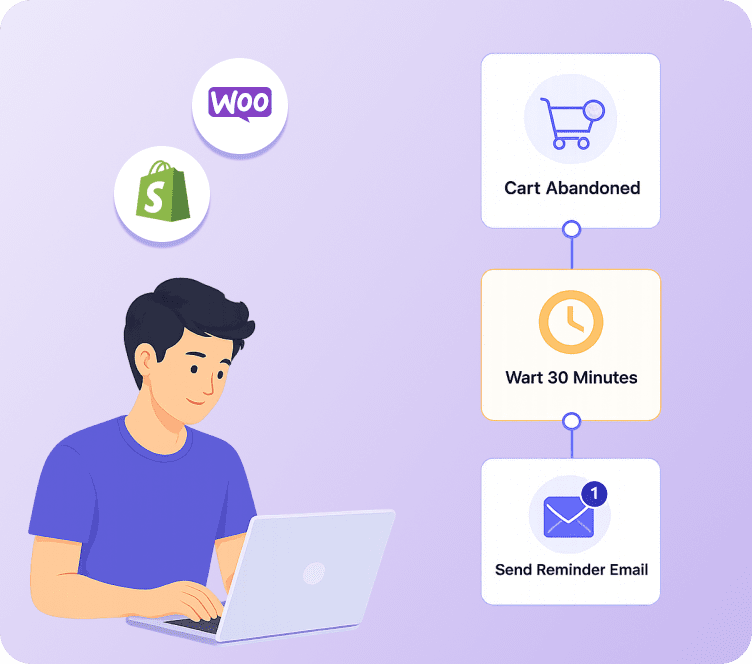
- Trigger abandoned cart recovery emails if they leave without buying
- Follow up with post-purchase automation once they complete an order
Because Adflipr uses active contact billing, you only pay for subscribers who are actually engaging, which makes it a cost-effective option for stores that are actively growing their list through popup forms. The goal is not just to collect emails. It is to turn every popup form submission into a real, revenue-generating relationship with that customer.
Key Takeaways
A popup form is one of the simplest tools an ecommerce store can use to stop losing traffic for good. When the timing, offer, and design are right, it becomes a quiet, always-on system that keeps growing your list every single day.
The stores that get the most out of their popup form are not the ones with the flashiest design. They are the ones that respect the visitor, keep the form short, make the offer specific, and connect every new subscriber to an automated follow-up that actually drives revenue.
If you are running a Shopify or WooCommerce store and want your popup form submissions to turn into real sales instead of sitting unused in a list, that is exactly where a platform like Adflipr can help.
FAQs
What is a popup form?
A popup form is a small overlay that appears on a website, usually asking a visitor for their email address in exchange for a discount, freebie, or update. It is triggered automatically based on behavior like time on page, scroll depth, or exit intent, rather than being something the visitor has to search for.
How does a popup form work?
A popup form works through a trigger, display, and submission process. A specific action, such as time on page or exit intent, causes the popup to appear. The visitor enters their information, and it is automatically sent to your email marketing platform, often starting a welcome email sequence right away.
Why are popup forms important for ecommerce stores?
Popup forms help ecommerce stores capture visitor information before they leave, since most people do not buy on their first visit. This builds an email list that can be used for welcome campaigns, abandoned cart recovery, and long-term customer retention, which is far cheaper than repeatedly paying for new traffic.
What is a good popup form conversion rate?
Averages sit around 4.8 percent across industries, but ecommerce stores tend to perform higher, often between 5 and 9 percent for standard offers. Gamified formats like spin-to-win popups can reach 8 to 15 percent, and top-performing campaigns can exceed 15 percent.
Is a popup form worth it for Shopify stores?
Yes. Since Shopify stores rely heavily on paid and social traffic, a popup form helps capture value from visitors who are not ready to buy immediately. Combined with automated welcome emails, it turns one-time visitors into a long-term subscriber base.
Is a popup form useful for WooCommerce stores?
Yes, WooCommerce stores benefit the same way, especially when the popup form is connected to an email automation platform. Since WooCommerce sites often rely on organic and content traffic, a scroll-triggered or exit-intent popup form tends to work particularly well.
What mistakes should I avoid with a popup form?
The most common mistakes are showing the popup too early, asking for too many fields, using a vague offer, ignoring mobile design, and failing to connect the popup form to automated follow-up emails. Each of these reduces both conversions and subscriber quality.
What is the best trigger for a popup form?
It depends on your traffic type. Time-based triggers (7 to 10 seconds) work well for general welcome popups, scroll-based triggers work well for content-heavy pages, exit-intent triggers work best for recovering visitors about to leave, and second-page triggers tend to convert the highest since they target visitors who have already shown real intent.