

Seven out of ten shoppers who put something in their cart never actually pay for it. That single number is why abandoned cart email automation is usually the first automation any Shopify or WooCommerce store sets up, and why it tends to pay for itself within the first month of running.
Most stores lose this revenue quietly. A shopper adds a product, gets distracted, closes the tab, and the store never hears from them again unless something reaches out. Abandoned cart email automation is that something. It is a workflow that detects the abandoned cart, waits a set amount of time, and sends a small sequence of emails to bring the shopper back.
In this article, we will walk through what this automation actually does, why it matters so much for revenue, and exactly how to build one inside Adflipr, an ecommerce email automation platform made for Shopify and WooCommerce stores, using a ready made pre built automation journey. We will also look at the small but important differences between Shopify abandoned cart email automation and WooCommerce abandoned cart email automation, since the setup is not the same on both platforms.
What Is Abandoned Cart Email Automation
Abandoned cart email automation is a workflow that automatically sends a short series of emails to a shopper after they add items to their cart but leave the site without completing checkout. It runs entirely on its own once it is set up, triggered by the shopper’s own behavior instead of a marketer manually chasing down every lost order.
It is one part of a wider category called email marketing automation for ecommerce, which also includes welcome flows, post purchase follow ups, and win back campaigns for inactive customers. Out of all of these, cart recovery flows are usually the strongest performers because they reach people who already showed they want to buy, not new visitors who barely know your brand.
Why Abandoned Cart Email Automation Matters for Your Revenue
Cart abandonment is not a minor issue, it is the single biggest revenue leak in ecommerce. The Baymard Institute has tracked average cart abandonment rates sitting around 70 percent across industries for years now.
Here is what that actually looks like for a store:
- 1,000 abandoned carts a month, 80 dollar average order value, a 10 percent recovery rate brings back 8,000 dollars a month
- 500 abandoned carts a month, 50 dollar average order value, the same 10 percent recovery adds 2,500 dollars a month
- 2,000 abandoned carts a month, 120 dollar average order value, even a modest 8 percent recovery equals over 19,000 dollars a month
A few reasons this automation outperforms almost everything else in an email program:
- It reaches shoppers who already picked a product and started checkout, not people seeing your brand for the first time
- Open rates and click through rates on cart recovery emails are consistently higher than regular newsletters
- Shopify and WooCommerce both make checkout data easy to capture, so messages can be personalized down to the exact product, price, and image left behind
How Abandoned Cart Email Automation Works (Trigger and Delay Logic)
At its core, this automation runs on one simple pattern: trigger, delay, send, repeat. Here is the standard, well tested structure used across the ecommerce industry, and the same one built into Adflipr.
The Standard Cart Recovery Sequence
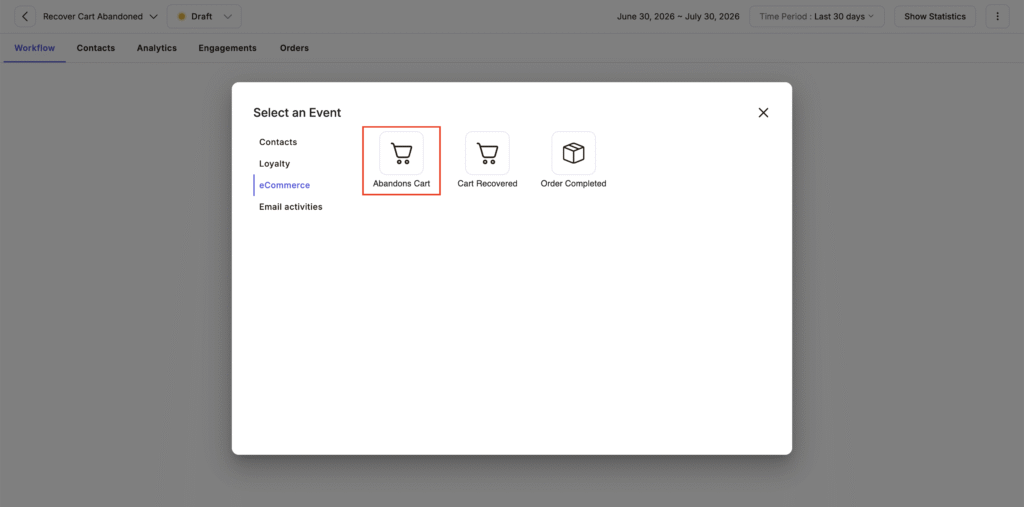
Trigger event: Cart abandoned or checkout started but not completed
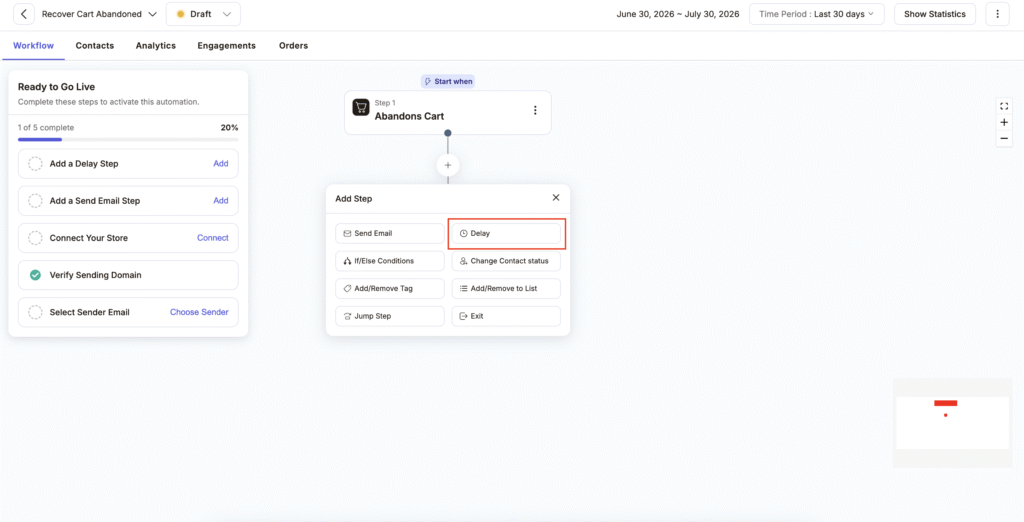
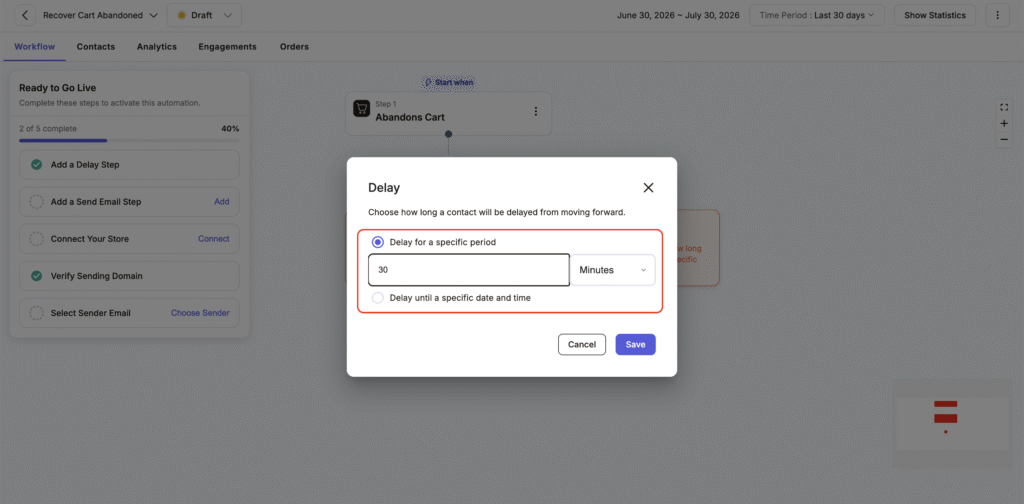
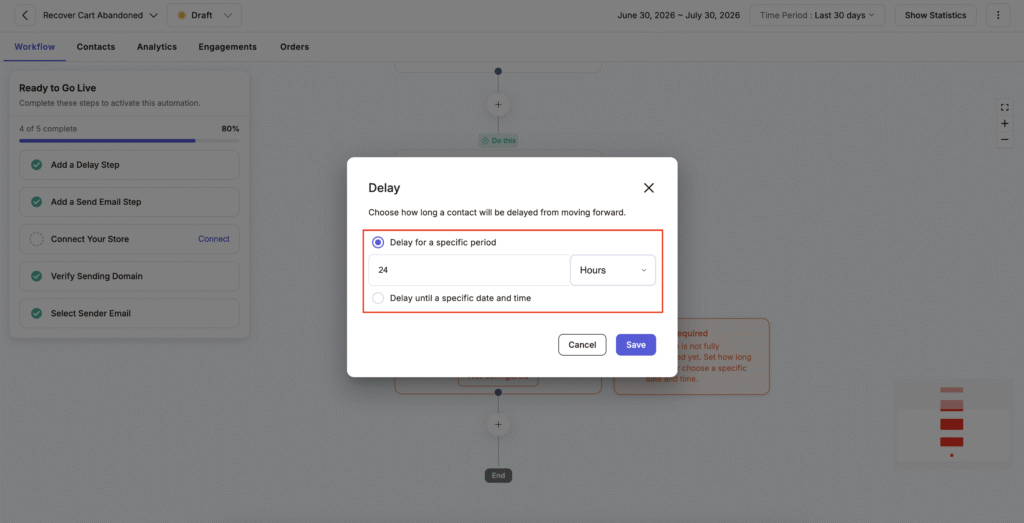
Delay 1: Wait 30 minutes
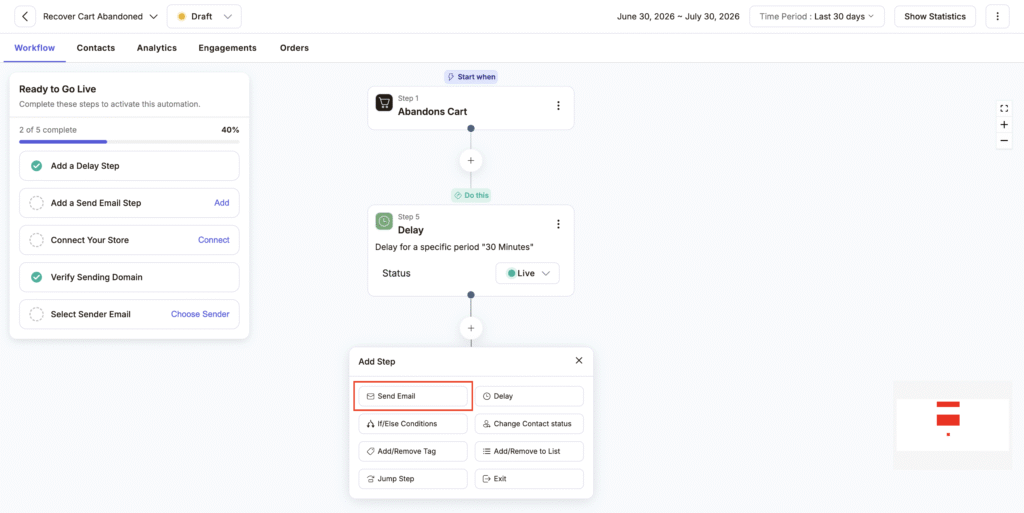
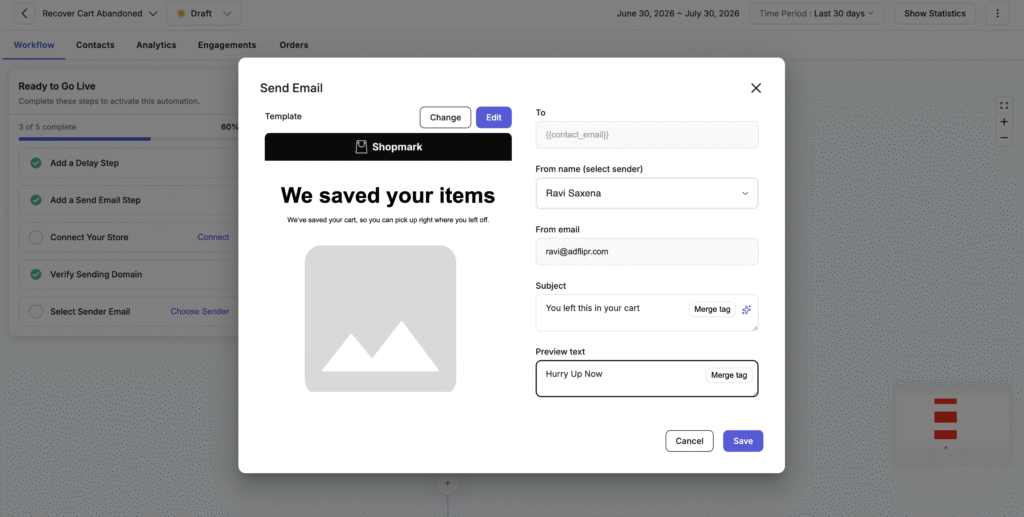
Email 1: Gentle reminder, no discount yet
Delay 2: Wait 24 hours
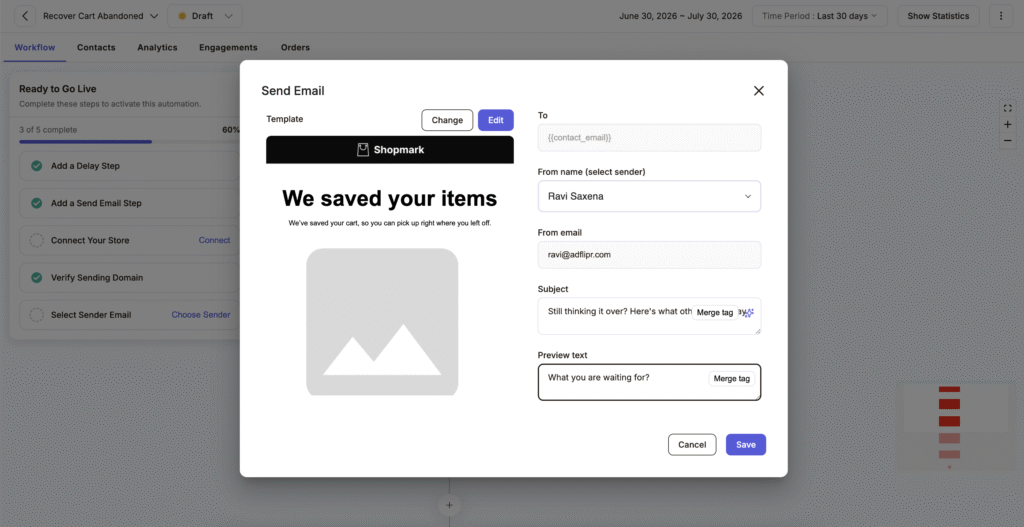
Email 2: Follow up with reviews, benefits, or answers to common objections
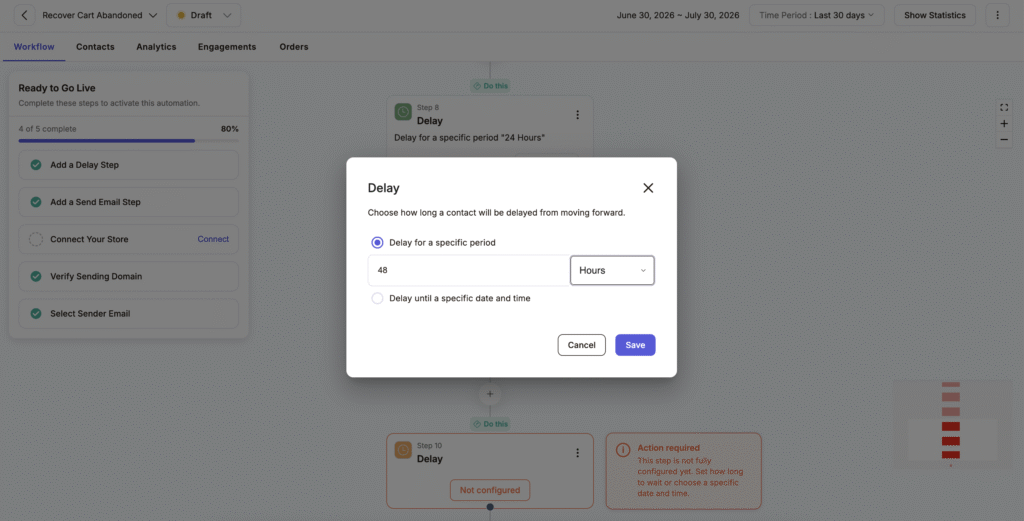
Delay 3: Wait 48 hours
Email 3: Final nudge, often with a small incentive like free shipping or a discount
End automation
This spacing is deliberate. Send too fast and the shopper feels chased. Wait too long and their intent to buy fades. The 30 minute, 24 hour, 48 hour structure covers the window where most recoverable intent still exists, without overwhelming anyone.
Subject Line Examples for Each Step
- Email 1 (30 minutes): “You left this in your cart”
- Email 2 (24 hours): “Still thinking it over? Here’s what other buyers say”
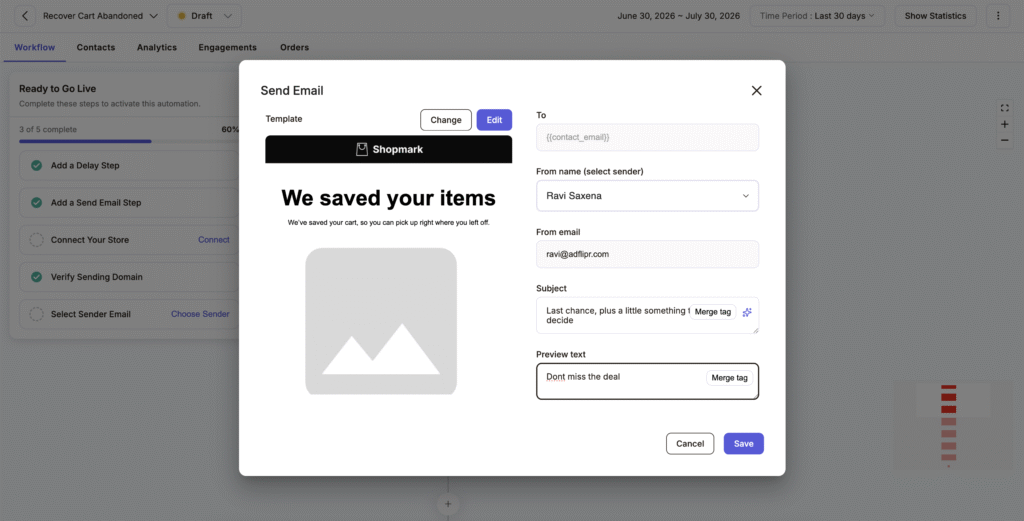
- Email 3 (48 hours): “Last chance, plus a little something to help you decide”
How to Build an Abandoned Cart Email Automation in Adflipr (Step by Step)
Adflipr offers this entire flow as a pre built automation journey, so the trigger and delay logic is already built for you. Here is how to set it up.
- Connect your store. Link your Shopify or WooCommerce store to Adflipr so it can read cart activity and checkout events in real time.
- Select the pre built automation journey. Inside the Automations tab, choose the Abandoned Cart Recovery journey. This pre built automation journey already contains the trigger and email structure ready to customize.
- Set the trigger event. Choose “Cart Abandoned” or “Checkout Started” as the event that starts the sequence.
- Configure the delay and email steps. Set the three step sequence: 30 minutes, then Email 1; 24 hours, then Email 2; 48 hours, then Email 3; then end automation.
- Personalize each email. Pull in the customer’s name, the exact product left behind, product images, and a direct link back to their cart.
- Segment by cart value. A shopper abandoning a 300 dollar order deserves different messaging than one abandoning a 20 dollar order.
- Set a stop rule. Make sure the automation stops sending the moment the shopper completes their purchase.
- Launch and track results. Monitor open rates, click through rates, and recovered revenue inside Adflipr’s dashboard, then adjust timing or copy based on what the data shows.
Because Adflipr bills based on active contacts rather than total list size, running an always on cart recovery flow like this stays affordable even as your subscriber list grows.
Shopify Abandoned Cart Email Automation: What to Know
Shopify tracks checkout sessions natively, which gives Shopify abandoned cart email automation very clean data to work with. Adflipr’s Shopify connection pulls in real time product images, variant details like size and color, and shipping information directly into the email.
One thing worth adding for Shopify stores specifically is browse abandonment tracking alongside cart abandonment. A shopper who viewed a product three times but never added it to cart is a different kind of warm lead, and a short separate automation can catch that group before they leave for good. This kind of behavior based targeting is also a big part of reducing customer acquisition costs with Shopify email marketing, since you are getting more revenue from visitors you already paid to bring in.
WooCommerce Abandoned Cart Email Automation: What to Know
WooCommerce abandoned cart email automation works a little differently under the hood, since WooCommerce runs on WordPress and cart data typically depends on cookies or a logged in account. This matters because a large share of WooCommerce shoppers check out as guests, and guest sessions are the easiest place for cart abandonment events to slip through unnoticed.
Adflipr’s WooCommerce integration is built specifically to capture these guest checkout events, not just logged in customer activity. If your store runs on WooCommerce, it is worth confirming your integration tracks guest carts, since this is where a lot of stores lose recoverable revenue without realizing it.
Real Examples of Abandoned Cart Automation Recovering Revenue
- Small Shopify apparel store: 600 monthly cart abandons, 45 dollar average order value. A 12 percent recovery rate brings back over 3,200 dollars a month from a flow that took under an hour to set up.
- Mid sized WooCommerce home goods store: 1,200 monthly cart abandons, 95 dollar average order value. Even an 8 percent recovery rate adds close to 9,000 dollars a month.
- Direct to consumer beauty brand: Groups shoppers by cart value, and sends anyone with a cart over 100 dollars a personal email from a product specialist instead of a discount. This protects profit margins while still recovering close to 15 percent of those high value carts.
How Adflipr’s Approach Is Different
Most ecommerce email automation platforms offer some version of cart recovery, but the details of how it is priced and built often work against smaller ecommerce stores. A quick comparison of common approaches:
| What matters | Typical email platform | Adflipr |
|---|---|---|
| Billing | Charges you for your full contact list, even inactive ones | Charges you only for contacts who are active |
| Setup | Often means building the workflow yourself from scratch | Pre built automation journey ready to customize |
| Guest checkout (WooCommerce) | Often missed, or needs an extra plugin | Included as part of the core integration |
| Grouping by cart value | Usually an advanced, manual feature | Built into the standard cart recovery flow |
This is the part that most articles on this topic tend to skip. The automation logic itself, trigger and delay, is fairly standard across the industry. The real difference between platforms shows up in fair pricing, and in how well they handle guest checkout and grouping shoppers by cart value right out of the box.
Best Practices for Abandoned Cart Email Automation
- Personalize every email with the customer’s name, cart items, and product images
- Keep subject lines specific to the actual product, not a generic “you forgot something”
- Use one clear button or link per email, avoid competing buttons or links
- Save the discount for the final email, not the first one
- Link straight back to the cart so checkout is one click away
- Test your timing, since some audiences respond better to a faster first send
- Exit the automation the moment a purchase is completed
- Segment by cart value so high value carts get different treatment
Common Mistakes to Avoid
- Sending only one email instead of a full sequence
- Leading every email with a discount, which trains shoppers to wait for a coupon
- Using generic copy that never mentions the actual product left in the cart
- Ignoring mobile design, even though most cart abandonment happens on mobile devices
- Forgetting to stop the automation once the purchase is complete
- Treating every abandoned cart the same, regardless of value or customer type
- Skipping guest checkout tracking on WooCommerce, which hides a large chunk of abandonment events
Conclusion
Abandoned cart email automation is one of the few marketing efforts that pays for itself almost immediately. A simple trigger, a three step delay sequence, and a bit of personalization is often all it takes for both Shopify and WooCommerce stores to recover revenue that would otherwise disappear at checkout.
Adflipr’s pre built automation journey gives you the trigger, delay, and email structure ready to go, whether you are running Shopify abandoned cart email automation or WooCommerce abandoned cart email automation. Connect your store, turn on the sequence, and let it start recovering sales while you focus on the rest of your business.
Frequently Asked Questions
What is abandoned cart email automation?
Abandoned cart email automation is a workflow that automatically sends a sequence of emails to shoppers who add items to their cart but leave without completing checkout. It uses a trigger event and timed delays to bring shoppers back and recover the sale without any manual follow up.
How does abandoned cart email automation work?
It works through a trigger and delay system. Once a shopper abandons their cart, the automation detects the event and waits a set amount of time. Then it sends a reminder email. This repeats across two or three emails, spaced further apart each time, until the shopper buys or the sequence ends.
Why is abandoned cart email automation important for ecommerce stores?
It is important because cart abandonment rates average around 70 percent across ecommerce. That means stores lose most of that potential revenue before checkout. This automation recovers a meaningful share of that lost revenue on its own. It often becomes the highest performing flow in a store’s entire email program.
What are the benefits of abandoned cart email automation?
The main benefits include recovered revenue, higher engagement than regular campaigns, and less manual work since the sequence runs by itself. It also improves the customer experience by reminding shoppers about products they actually wanted, instead of pushing unrelated promotions.
Is abandoned cart email automation worth it for Shopify stores?
Yes, it is one of the highest returning automations available for Shopify abandoned cart email automation setups. Shopify provides clean, real time checkout data that makes personalization straightforward. Most Shopify stores see this automation outperform regular campaigns within a few weeks.
Is abandoned cart email automation useful for WooCommerce stores?
Yes, WooCommerce abandoned cart email automation is especially useful. A large share of WooCommerce abandonment happens during guest checkout, and store owners often miss this without the right integration. A properly connected automation catches these events and recovers revenue that would otherwise go untracked.
What mistakes should I avoid with abandoned cart email automation?
Avoid sending only a single email, leading every message with a discount, and using generic copy that ignores the actual cart contents. Also remember to stop the automation once the shopper completes their purchase. These mistakes reduce both recovered revenue and customer trust over time.